

- API Key: You can generate an Endor Labs API key and secret and configure Outpost to use it.
- Azure Managed Identity: You can configure Outpost to use an Azure managed identity for authentication. Applicable if you use Azure Kubernetes Service (AKS). You must also configure a corresponding authorization policy in Endor Labs.
- GCP Service Account: You can configure Outpost to use a GCP service account for authentication. Applicable if you use Google Kubernetes Engine (GKE). You must also configure a corresponding authorization policy in Endor Labs.
API key authentication for Outpost
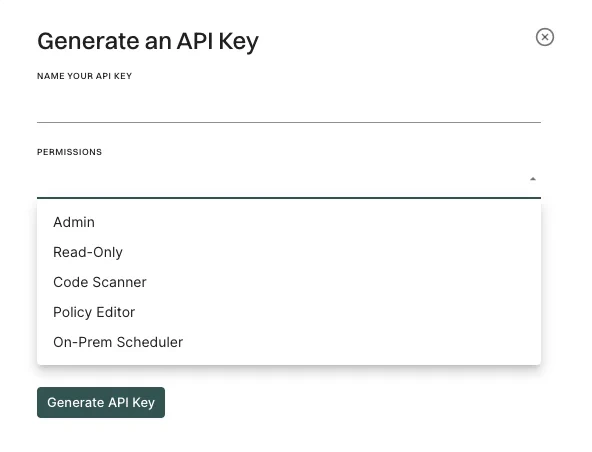
You can create an Endor Labs API key and secret to authenticate your Outpost configuration. See API keys for more information. Ensure that you selectOn-prem Scheduler as the API key permissions.
Azure Managed Identity authentication for Outpost
Perform the following steps to configure Outpost to use an Azure managed identity for authentication.- Enable workload identity in the AKS cluster.
- Enable OIDC provider in the AKS cluster.
-
Create an Azure managed identity.
The command creates a zero-permission managed identity. Store the
clientIdfor later use. -
Run the following command to retrieve the OIDC Issuer from AKS.
The command fetches the OIDC issuer URL for federated authentication. Ensure that you enable OIDC and Workload Identity in the AKS cluster.
-
Create federated credentials for workloads.
Run the following command to create the scheduler federated credential.
Run the following command to create the endorctl federated credential.The commands link the managed identity to Kubernetes service accounts and enable secure access without static credentials.
- Configure an authorization policy in Endor Labs with configuration from Azure.
- Configure the Outpost integration with Managed Identity Client ID. See Outpost configuration for more information on how to configure the Outpost integration.
GCP Service Account authentication for Outpost
Perform the following steps to configure Outpost to use a GCP service account for authentication.- Enable workload identity in the GKE cluster.
- Enable OIDC provider in the GKE cluster.
-
Create a new workload service account.
-
Grant roles/iam.serviceAccountOpenIdTokenCreator to workload service account.
-
Create a zero-permission service account for Endor Labs to perform federation.
-
Allow the Kubernetes service accounts to impersonate the IAM workload service account.
- Configure an authorization policy in Endor Labs with configuration from Google Cloud.
- Configure the Outpost integration with Service Account Name. See Outpost configuration for more information on how to configure the Outpost integration.