

ignore command to add findings or vulnerability IDs to the ignore file, which is used to dismiss findings during scans. This allows developers to request exceptions directly in their pull requests and provides teams with the option to manage exceptions directly in the source code.
You must enable ignore file support in Settings > SYSTEM SETTINGS > Developer Workflows for ignore files to be processed during scans.
Usage
The syntax of theendorctl ignore command is:
--finding-uuid, --vuln-id, or --interactive. If you provide a
finding UUID, you must also provide --namespace.
The more fields you provide, the more specific the ignore entry is. For example, if you only provide the finding name and there are multiple findings with the same name in the same repository version, the ignore entry is applied to all of them.
Options
The commandendorctl ignore uses the following flags and environment variables:
Examples
Ignore a finding based on UUID
Ignore a specific finding based on the UUID and enter details such as reason and expiration-date interactively: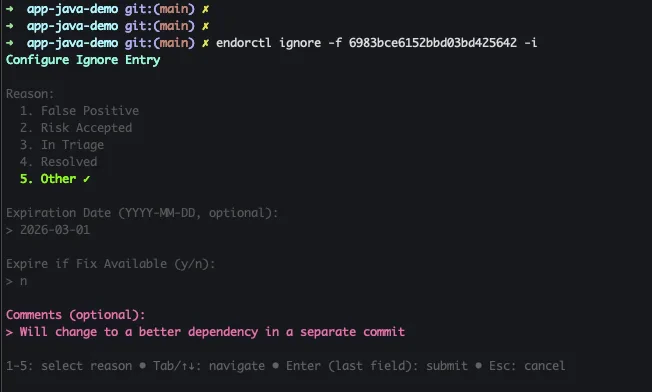
Ignore entry based on finding UUID and interactive input
Here the user entered the reason, expiration date, and comments interactively. The rest was automatically populated based on the finding UUID. The default prefix is the finding project name.Enter all details interactively
Enter all details about which findings to ignore interactively, without the UUID: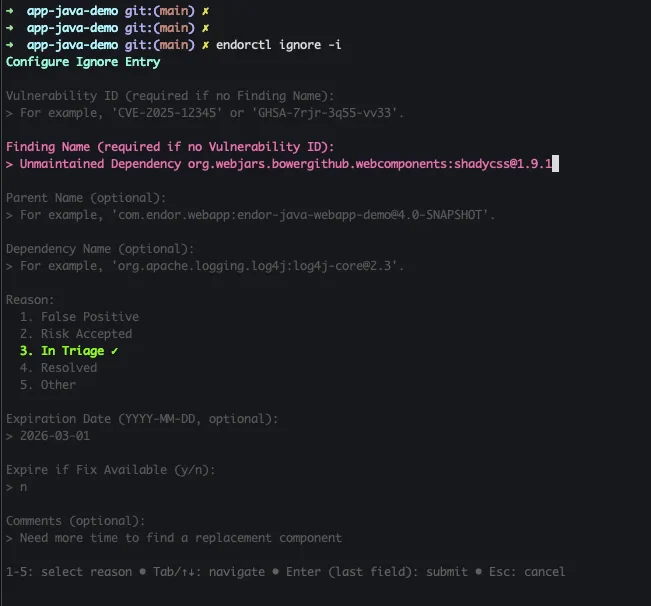
Ignore entry based on interactive input only
Here the user entered the finding name, reason, expiration date, and comments interactively. The default prefix isendorignore-.